I have never enjoyed grading as much as I did while viewing the movies created by my students for our crime lab. Here are the main lessons I learned from this project to remember for next year.
1. Only allow students to use first names in projects. I will not post anything on here that has a last name. That definitely limits me on the number of videos I can show you.
2. You can never have enough bandwidth when uploading projects. Thank goodness I was on spring break the week after projects were due. I was able to focus on getting the projects uploaded to Vimeo when no one else was on our network. Even at that, I averaged 10 minutes per iPad movie.
3. Check weekly limits for free video uploading so you don't have to pay. Because I did not want to spend money when uploading videos, I could only upload about 20 movies a week. I was lucky to have my weekly limit reset on Tuesdays to get them all done.
4. Providing an iMovie tutorial is extremely helpful to keep frustration at a minimum. Students were at different levels of comfort with the app so I made sure I was available to help learn the quirks with them and share anything learned from other students as the days progressed. There are some fabulous YouTube tutorials out there!
5. Be patient and prepared for failure. In anything new, especially technology minded, I have learned that what I think will take 20 minutes may take an hour. However, I have learned more from those failures than anything that goes right the first time through.
6. Be ready to have your socks knocked off! I am still marveled by my students. I am one proud "school mom"!
Grab your popcorn and enjoy the shows!
To learn more ways in which I am using technology in my classroom, follow me on Twitter @eglassman757.
Sunday, March 17, 2013

Monday, March 11, 2013
Please DO Ask Questions and Make Comments During the Movie!
Today I used a new twist on the old... Today'sMeet. The old is watching a movie, and the new is being allowed to have a conversation while the movie is playing! I learned about this website back in November from Shawn McCusker (gowhereyougrow.wordpress.com) and am finally putting it to use.

By using Today'sMeet, I am looking at the "back channel" of my classroom. What are back channels you might wonder? They are the behind the scenes conversations and notes that students use to seek clarification during classroom activities. They are secondary conversations to what is primarily happening in the classroom.
We started the movie, Gattaca, in biology today. If you haven't seen it, the plot consists of a society in the "not so distant future" that uses genomics and biometrics to create and organize society. Students have many questions about the movie, especially on the first day. Before class, I created a Today'sMeet url for each class. It is very simple and lasts for a set amount of time. I selected ours for one week. This url is then provided to students to join the chat.
When my students came to class, they used their assigned iPads to log on to the network. I then explained the "Rules of Theater 416." Your rules need to be well defined. Posts cannot be erased and are seen by all who participate.
I kept the rules clear and simple:
1. Only have the Today'sMeet page open on your iPad. All other apps are closed.
2. Log-in using first name.
3. Post an original comment or question during the movie.
4. Respond to another student’s comment or question during the movie.
5. Any unacceptable posts will result in a zero for the assignment.
So, how did it go? Check out this screen shot for the answer. This is just a portion of a conversation during the first 30 minutes of the movie.
I launched this idea today hoping that it just wouldn't crash and burn. Instead, I am marveled by the genuine interest and dialogue shared by my students. I can't wait to see what I will learn from them tomorrow.
To learn more ways in which I am using technology in my classroom, follow me on Twitter @eglassman757.
By using Today'sMeet, I am looking at the "back channel" of my classroom. What are back channels you might wonder? They are the behind the scenes conversations and notes that students use to seek clarification during classroom activities. They are secondary conversations to what is primarily happening in the classroom.
We started the movie, Gattaca, in biology today. If you haven't seen it, the plot consists of a society in the "not so distant future" that uses genomics and biometrics to create and organize society. Students have many questions about the movie, especially on the first day. Before class, I created a Today'sMeet url for each class. It is very simple and lasts for a set amount of time. I selected ours for one week. This url is then provided to students to join the chat.
When my students came to class, they used their assigned iPads to log on to the network. I then explained the "Rules of Theater 416." Your rules need to be well defined. Posts cannot be erased and are seen by all who participate.
 |
| This is what the conversation looks like on the iPad screen. |
1. Only have the Today'sMeet page open on your iPad. All other apps are closed.
2. Log-in using first name.
3. Post an original comment or question during the movie.
4. Respond to another student’s comment or question during the movie.
5. Any unacceptable posts will result in a zero for the assignment.
So, how did it go? Check out this screen shot for the answer. This is just a portion of a conversation during the first 30 minutes of the movie.
 |
| This is a screen shot of a portion of the transcript from one class. |
To learn more ways in which I am using technology in my classroom, follow me on Twitter @eglassman757.
Wednesday, February 27, 2013
Suspects and Crime tape and iPads, Oh My!
My students are currently finalizing their Crime Lab 2013 projects. This three week unit is what pushed me to start this blog. I was posting pictures and updates on Twitter, and actually had requests to blog about the project! So here goes!
I started doing a forensic science unit 12 years ago. It started with two suspects and four classes of students. It has now evolved into having 137 biology students divided into investigation teams (one per suspect), 42 faculty suspects and one faculty victim. My colleague, Scott Fowler, and I co-teach the unit for three weeks. It is fantastic to have flexibility in our schedules to work and collaborate as we do. It is also wonderful to have the opportunity to interact with every single 9th grade student in our school. This year's major change: an iPad is assigned to each team for the duration of the project.

The apps that have been most critical for this project are Explain Everything, Dropbox, Google Drive, and iMovie. This is also the point to recognize Ed Patterson, our Director of Academic Technology. He has been our "go to guy" for all questions iPad. He is patient with my questions, and flexible to meet and work with students. Having solid academic tech support is essential.
 First, students are introduced to evidence collection by Joan Turner, City of Suffolk Education Outreach Coordinator, and chain of custody by Matthew Glassman, a Deputy Commonwealth's Attorney in Suffolk, Virginia. Walking students through a case prior to their assignment has proven to be very helpful.
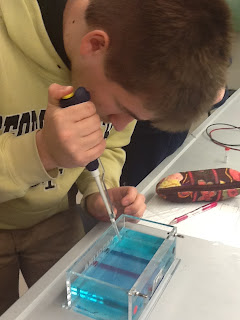
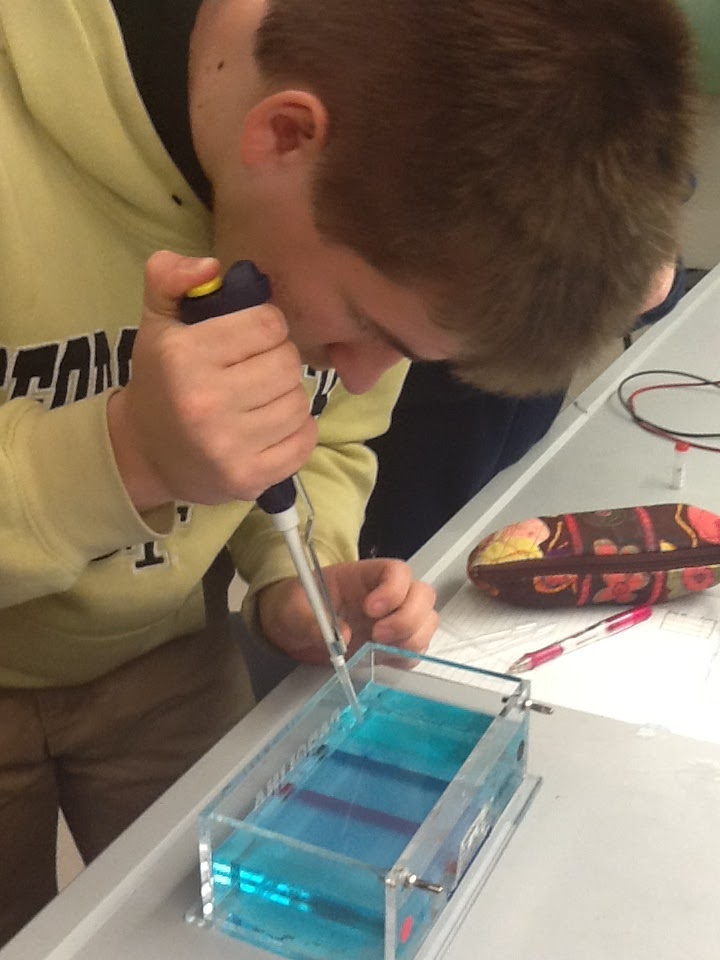
Students navigate through the project by completing a series of tasks and labs that narrow the suspect list from 42, to 10, to 4 to the top two suspects. DNA profiling reveals the guilty suspect. The highlighted activities include hair analysis, fingerprint analysis, blood spatter pattern, drug analysis, karyotype analysis, blood typing and DNA profiling. Three key points of any good evidence collector are photos, notes and sketches. As teams progress through the lab, they are able to do all of this in one organized location....the iPad.


 Bottom line, iPads shouldn't ever replace collaboration, conversation, reading, writing, and data analysis. Students need to interact with each other.
Stay tuned for the forensic teams' iMovie "Mockumentaries" that are due by Friday this week!
To learn more ways in which I am using technology in my classroom, follow me on Twitter @eglassman757
I started doing a forensic science unit 12 years ago. It started with two suspects and four classes of students. It has now evolved into having 137 biology students divided into investigation teams (one per suspect), 42 faculty suspects and one faculty victim. My colleague, Scott Fowler, and I co-teach the unit for three weeks. It is fantastic to have flexibility in our schedules to work and collaborate as we do. It is also wonderful to have the opportunity to interact with every single 9th grade student in our school. This year's major change: an iPad is assigned to each team for the duration of the project.

The apps that have been most critical for this project are Explain Everything, Dropbox, Google Drive, and iMovie. This is also the point to recognize Ed Patterson, our Director of Academic Technology. He has been our "go to guy" for all questions iPad. He is patient with my questions, and flexible to meet and work with students. Having solid academic tech support is essential.
 First, students are introduced to evidence collection by Joan Turner, City of Suffolk Education Outreach Coordinator, and chain of custody by Matthew Glassman, a Deputy Commonwealth's Attorney in Suffolk, Virginia. Walking students through a case prior to their assignment has proven to be very helpful.
 |
Students navigate through the project by completing a series of tasks and labs that narrow the suspect list from 42, to 10, to 4 to the top two suspects. DNA profiling reveals the guilty suspect. The highlighted activities include hair analysis, fingerprint analysis, blood spatter pattern, drug analysis, karyotype analysis, blood typing and DNA profiling. Three key points of any good evidence collector are photos, notes and sketches. As teams progress through the lab, they are able to do all of this in one organized location....the iPad.



Stay tuned for the forensic teams' iMovie "Mockumentaries" that are due by Friday this week!
To learn more ways in which I am using technology in my classroom, follow me on Twitter @eglassman757
Tuesday, February 26, 2013
Jumping Off With My Water Wings Fully Inflated
I am sitting at my computer with a mind full of ideas, anticipation and excitement... much like the feeling of being on the edge of the pool, deciding if I should jump in or sit back and do a little more watching. Today is the day I have finally decided to put my water wings on like a big girl and jump into the deep-end of the blogging pool. I am intrigued by this world of collaboration, and watch in awe, as other educators put their ideas out there to share with the rest of us. I never thought of myself as someone who should make a blog. What could I have to contribute to these other educators who are worlds beyond me in education technology adventures? The answer to that question started a couple of years ago when my colleague and I decided to apply to have a class set of iPads introduced into our classrooms. Our school (www.norfolkacademy.org) believed in our vision and we started this current school year with iPads in our Biology classrooms. E-texts replaced hardbound textbooks, and iPads replaced the daily puzzle of having to find a computer lab to access our texts. I hoped that this transition would be smooth, but was realistic to know it would be challenging. To help me navigate more effectively, I was again, given an amazing professional opportunity to attend the Ed Tech Teacher iPad Summit in November. To say this was life changing is an understatement. I quickly learned three main lessons: 1. iPads are for creating, not just consuming. 2. iPads do not replace me as a teacher. 3. Failure is expected. So here I am three months later, after being encouraged by some amazing educators I met at the ETT iPad Summit (www.edtechteacher.org), starting a blog. Before I go any further, I owe special thanks to Beth Holland, Shawn McCusker, Autumn Laidler and Jennie Magiera for being my "swim coaches" in this blogging pool! Check out their amazing work by following them on Twitter!
The major lesson I learned as I have been on this iPad adventure is that I have so much to learn. I am a teacher, mom, wife, friend, coach. I wear many hats, as we all do. In every facet of my life, I am constantly learning how to be better, more effective, more efficient... more understanding. I am not one to sit idle. I have realized that I will always have a thirst for knowing more. To know more, I need to ask questions and share answers. Thus finding the answer to the question of what I have to offer to the world of blogging. So, as I jump into this pool of discovery, I invite you to join me and understand why I will always be "The Forever Student."
To learn more ways in which I am using technology in my classroom, follow me on Twitter. @eglassman757
The major lesson I learned as I have been on this iPad adventure is that I have so much to learn. I am a teacher, mom, wife, friend, coach. I wear many hats, as we all do. In every facet of my life, I am constantly learning how to be better, more effective, more efficient... more understanding. I am not one to sit idle. I have realized that I will always have a thirst for knowing more. To know more, I need to ask questions and share answers. Thus finding the answer to the question of what I have to offer to the world of blogging. So, as I jump into this pool of discovery, I invite you to join me and understand why I will always be "The Forever Student."
To learn more ways in which I am using technology in my classroom, follow me on Twitter. @eglassman757
Subscribe to:
Posts (Atom)